27.4.2022 - 25.5.2022 (Week 5 - Week 9)
Ang Shin Er / 0355231
Bachelor Of Design (Hons) In Creative Media / Taylor's University
Digital Photography and Imaging // Project 2 : Digital Imaging
_
LECTURES
WEEK 5 - DOUBLE EXPOSURE
Double Exposure & Image Blending Mode
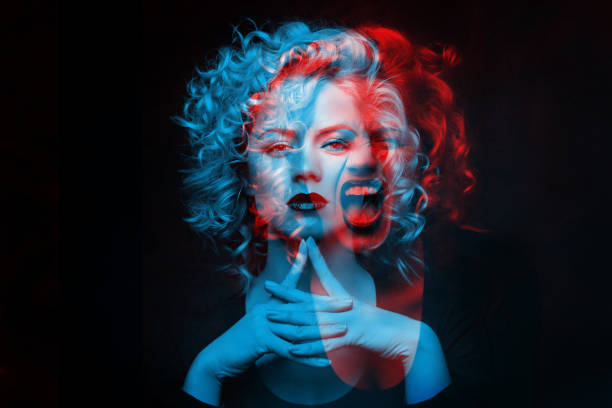
Double exposure photography refers to merging multiple images. The goal
is to make them surreal, emotional, or humorous. They usually feature
silhouettes.
Double exposure effects can make in-camera and Adobe
Photoshop without a double exposure camera, as there are a few other ways you
can create them.
1. Using the Tilt-Shift Effect - Photoshop has a great tilt-shift tool
that will transform your photos into soft works of art. To add this
feature, go to Filter > Blur Gallery > Tilt-Shift.
2. Create fake reflection - One of them is creating a
double exposure with the help of a separate window photo. This is an example
of the main subject surface with raindrops and bokeh. This help to add
interesting textures to multiple exposure photography.
3. Experiment with simple portraits and details textured - Combining
something plain with something complicated will give you a balanced
result.
4. Convert your results to Black & White - It gives them a unique
depth and allows you to experiment with something interesting just like film
photography.
5. Work with silhouette - An opportunity to show our creative
sides to create unique composite images.
6. Pick two random photo - Your results might create a story of
their own, one that others will find encouraging.
7. Make simple objects look fascinating - A silhouette of a
dull-looking building could become the outline of a starry sky like the
photo below. This technique will enhance your image.
8. Use Shadow - Shadows are as effective as silhouettes in this
genre. They’re fascinating to work with.
PHOTOSHOP: Blend Modes
A particular blending mode works really well on more difficult
subjects like glass, smoke, fire and lightning.
How to combine the smoke on top of the image of the musicians? A real
mess could be made of this and it could become very difficult and time
consuming.
Here’s a quick guide:
-
Select the Layer 1 (Fire) to be on top of the Background (Musicians)
- Go to the Blending Modes option
- Select “Screen”
-
As a result, all of the pixels on the fire will be selected as Screen
blending mode.
WEEK 6 - PHOTO MANIPULATION
Definition: Photograph manipulation involves the transformation or
alteration of a photograph usingvarious methods and techniques to achieve
desired results.
Widely accepted as an art form, photo manipulation requires skill as well as an active imagination
to create an illusion.
Imaginative & Creative idea - Develop a good concept.
-
Illusion that is created by a combination of 2 objects.
-
Pinterest to view lots of photo manipulation works, pins them.
-
Find objects in your surrounding that you can use for the
project.
-
Sketch your idea.
WEEK 7 - DIGITAL PHOTOGRAPHY
| EXPOSURE SETTING
EXPOSURE: In photography, exposure is the amount of light which reaches your camera sensor or film.
The main parts of the camera:
Camera body: light proof box.
- Shutter
- Image sensor
- LCD screen
Camera lens: Aperture/ Iris
There are only two camera settings that affect the actual “luminous exposure” of an image: shutter speed and aperture. The third setting, camera ISO, also affects the brightness of your photos.
1 : IRIS: Iris/Aperture is control the flow of light entering the lens.
2 : SHUTTER: The shutter is a small plastic sheet that opens and closes to allow light onto the film or prevent light from reaching the film.
| SHUTTER SPEED: Shutter speed is measured in seconds: 1/1000 s,1/500 s,1/250 s,1/125 s,1/60 s,1/30 s,1/15 s,1/8 s,1/4 s,1/2 s,1 s, 2 s, 3 s…
3 : ISO : Originally referred to the sensitivity of film—it's "light gathering" ability. For digital photography, ISO refers to the sensitivity—the signal gain—of the camera's sensor.
| ISO: The lower the number of ISO the less sensitive your camera is to light and the finer the grain.
The are wide angle lens, standard lens and tele lens. Appropriate lens provided desire framing, lens choice affects angle of view.
Different lenses are designed for different for different purposes. Lenses can be categorized by FOCAL LENGTH.
| FOCAL LENGTH: The shorter the focal length, the wider the angle of view and vice-versa.
| DEPTH OF FIELD:
The proportion of the image that is reasonably sharp and in focus.
The smaller the aperture you use, the greater the depth of field.
Wide angle lenses are ideal for fitting a large area into your frame.
Standard lens offer a fairly accurate representation of what the human eye sees, both in terms of visual angle and perspective.
Tele lenses are great for isolating a subject that is far away.

DSLR V.S SMARTPHONE
| PRO : Familiar with device, Good quality, Easy to learn
| CON: Still limited, Good but not great, Non-ergonomic shape
WEEK 9 - DIGITAL SURREALISM

| REALISM VS SURREALISM
REALISM :Takes subject matters of the ordinary and common world which we call "reality." It almost always takes a non-exotic and non-extraordinary subject matter and theme. There is no need to think outside of the box, as that is not "real."
SURREALISM: A twist on Realism. It explores the subconscious mind, with subject matters concentrating on dream-images and often aims to distort the ordinary and what we call reality
SURREALISM: Surrealism defies logic. Dreams and the workings of the subconscious mind inspire surrealistic art (French for "super-realism") filled with strange images and bizarre juxtapositions.
Fueled by the teachings of Freud and the rebellious work of Dada artists, surrealists like Salvador Dalí promoted free association and dream imagery.
DASAISM: An anti war art movement with art works that is satirical and nonsensical in nature.
SALCADOR DALí : Salvador Dalí was a Spanish Surrealist painter and printmaker known for exploring subconscious imagery.
| WHAT IS DIGITAL SURREALISM?
Surrealism is a cultural movement focused on type of arts to express about the artist’s idea themselves. In this digital era surrealism is one of the top digital art styles.
| How to start creating Surrealism artworks?
Dream-like scenes and symbolic images
Unexpected, illogical juxtapositions
Bizarre assemblages of ordinary objects
Primitive or child-like designs
Capturing your Dream
- Sketch It Out : Take a piece of paper and pen/pencil or a tablet and start to sketch. Draw your vision out roughly. Don't finesse any details yet, but just lay out key points of your vision.
- Find Reference Images: Gathering reference images will help you greatly in realizing your new idea. Gather images that directly relate to what you have in mind.
Mindset During Creation
- "Does this look real?" : Surrealism is at its best when it's convincing enough that it could be real, however we obviously know that the subject matter you are creating is nonexistent, thus is not real.
- Make it happen to the best of your ability.: when you try to approach something challenging, you will learn the skills you may need for next time to make it work. The worst thing you can do is be afraid and back off from your idea, because you would never learn that way.
Photoshop makes it easier than ever to create surrealist images, requiring just a modicum of photomontage skill to produce impressive results.
INSTRUCTION:
PRACTICAL:
WEEK 5 | PROJECT 2A - DESIGN EXPOSURE
First, paste down the image that given by Mr Fauzi. Then crop out the women inside by using selection tool. Note for photoshop:
- Click “Select Subject” at the bar
- Click “Select and Mask” at the top to adjust
- Using "Refine Edge Brush Tool" to crop out small details such as hair
Apply a "S" curve to let the black areas looked more clearly to define.
Import a new forest image based on the selected area of the mask.Then, the borders on the forest photo are then eliminated by the mask. Next, apply a solid colour for the background by selecting the “grey sky colour” with eyedropper.
Select the brush tool and make sure is in colour black. Unmask the face part.
Adding the element inside such as birds.
Adjust the gradient for the final result. Note for photoshop:
- Add Gradient layer.
- Select a gradient that you want
- Adjust the opacity.
Last, remember to add the cloud images inside.
|DOUBLE EXPOSURE - My Reflection
First, import my own photo and remove the background by using selection tool.
I selected a night city image and paste the image based on the selected area of the mask.
WEEK 6 | PROJECT 2B - PART 1: HEART MANSION
First, paste down the Shazam that given by Mr Fauzi and crop it out by using selection tool. Then, move and compose it to the correct place. Note for photoshop:
- Click “Select Subject” at the bar
- Click “Select and Mask” at the top to adjust
Then, adjust the colour correction. Note for photoshop: Image - Adjustments - Match Colour.
Add Noise filter to Shazam to match the image quality.
Adding shadow for Shazam by using brush tool then apply gaussian blur to it. Next, adjust the opacity.
Copy Shazam and paste it then flip it to create a refection. Then, adjust the hue and saturation and apply Ripple filter to Shazam reflection. Note for photoshop:
- Image - Adjustments - Hue/Saturation. (cmd + U)
- Filter - Distort - Ripple
My Final Outcome
|PART 1: HEART MANSION - My Reflection
Take a photo that suit the picture then crop it out by using selection tool. Then, move and compose it to the correct place.
Apply a shadow under the picture. Then, adjust the opacity.
Paste it then flip it to create a refection and erase the leg part. Then, adjust the hue and saturation to fit the image.
My Final Outcome
WEEK 6 | PROJECT 2B - PART 2: RECOLOURING B&W
First, add another layer and paste the same image that given then mask it by using quick
selection tool then,
Select overlay and edge refine
tool to brush over the edges.
Create new solid layer and choose a hair colour.
To choose overlay to let the colour look more natural
Keep repeat the process to all the part.
- Output to layer mask
- Create a new solid layer, choose the colour that fit to it by using colour picker.
- Drag and drop hair layer mask to new solid layer to replace layer mask,
- Select one of the blending mood (Overlay)
|PART 2: RECOLOURING B&W - My Reflection
First, choose a favorite photo from several options that given. I choose this the women look clear and sharp and I would like to practice my recolouring skill and let it look like what was actually photographed. selection tool.
Use the quick select tool to select the part that I want to recolor such as hair, skin, lips and etc. To refine the hair, I am going to use e let it more detailed.
Then choose a colour that match the women.
I am going to use Soft Light (blending mode)
Applying a solid colour for background
Before apply a solid colour for background
After apply colour for background
WEEK 7 | PROJECT 2C - PHOTO MANIPULATION
This project is an exercise in creative ideas, compositing all manner of everyday objects to create interesting composite photographs.
|Research Mood Board:
|Idea Sketches:
I used to imagine there is a small world or a lilliputian living in our daily life,or a witch with a bad magic. So I my idea is to create a small world that related to our daily life. I started with some rough sketch. Here are my sketches.
#1st sketch
#3rd sketch
I decided to choose my 3rd sketch. I have set up a simple photo booth with a coaster to let the egg stand. After that, setting the camera and using flashlight to let light and shadow more visible
The result of the photography:
Start with cropping out the egg by using the quick selection tool and make some adjustment to let it look more bright.
Adding the hut and crop it out and some element.
Then, add a shadow under the egg by using brush tool and apply gaussian blur to the shadow.
Here are the result of the upper part and the lower part.
Inside the egg and there is a creepy hut at the foot of the mountain, which combined all my imagination in one photo. The reason why I choose egg is because eggs is the things/foods that appear in our daily life is easy to found it. Then combine some grey cloud, birds and dark moon that make everything look spooky.
| Final Artwork (WEEK 11)
TITLE: A BAD EGG
| DESCRIPTION: A little spooky world I imagined is inside the egg, so I named it as a bad egg. Another definition of bad egg instead of smelly bad egg is to describe a person who does a bad thing. This photo also describes a social phenomenon like school bullies, violence in media, drugs, bad parenting and others which I saw in the news recently and its continues to happen.
_


.png)


Comments
Post a Comment